Community testing
is open.
Help test Network Simulator 2 (NS-2) and NAM across different Mac models and macOS versions, from MacBook Air and MacBook Pro to Mac mini and iMac. Successful runs are just as useful as bug reports.
ISSUE #3SUBMIT YOUR TESTING REPORTNS-2 + NAM
MAC COMPATIBILITY TEST RUNHOW TO TAKE PART
What to do
- 01Read the installation guide
- 02Install using the normal end-user process
- 03Launch NS-2 and NAM
- 04Run the included sample simulation
- 05Submit your report
Please use the regular installation process. You do not need to clone the repository, download its ZIP, build Docker manually, or edit source files.
WHAT TO SHARE
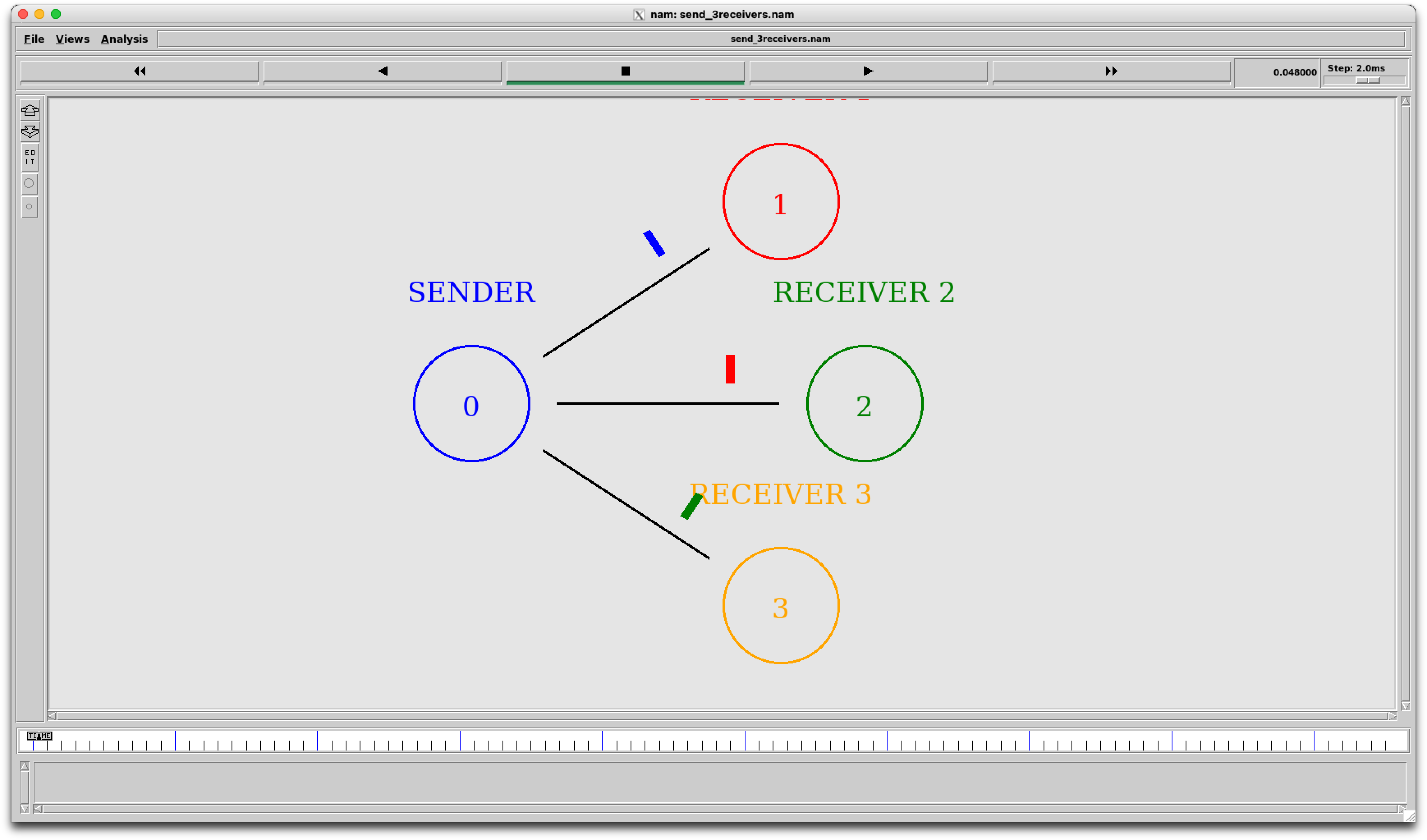
Show NAM in action
Please include a screenshot of the NAM window displaying a running network simulation. Screenshots of installation errors or other problems are welcome too.
Privacy reminder Hide passwords, private IP addresses, usernames and other sensitive information before uploading screenshots.
INCLUDE IN YOUR REPORT
System and test results
Share what you know; mark anything unavailable as “Not sure.”
System information
- Mac model
- e.g. MacBook Air 13-inch
- Processor
- M1 / M2 / M3 / M4 / newer
- macOS version
- Installed version
- Docker Desktop
- Installed version
- XQuartz
- Installed version
- Xcode Command Line Tools
- Installed / Not Installed / Not Sure
Testing results
- Installation
- Successful / Failed
- NS-2
- Working / Not Working
- NAM
- Working / Not Working
- Sample simulation
- Successful / Failed / Not Tested
Problems and suggestions
Describe errors or difficulties, confusing installation steps, and improvements you would suggest.
Developer contributions: Fix compatibility issues, improve installation scripts, suggest enhancements, or submit a Pull Request.
Copyable report template
Choose a format, fill in the details, then submit it as a GitHub comment or by email.
Paste this Markdown into a comment on GitHub Issue #3.
### Tester Information
- **Name / Pseudonym:** (Use any random name if you prefer to remain anonymous)
- **LinkedIn Profile URL:** (Optional)
- **GitHub Profile URL:** (Optional)

### Mac Configuration
- **Mac Model:**
- **Processor:** M1 / M2 / M3 / M4 / Other
- **macOS Version:**
- **Docker Desktop Version:**
- **XQuartz Version:**
- **Xcode Command Line Tools:** Installed / Not Installed / Not Sure

### Testing Results
- **Installation:** Successful / Failed
- **NS-2:** Working / Not Working
- **NAM:** Working / Not Working
- **Sample Simulation:** Successful / Failed / Not Tested

### Problems Encountered
Describe any errors or difficulties you faced.

### Suggestions & Improvements
What could be improved? Did you encounter any confusing steps?

### Additional Comments
Any other feedback is welcome!SubjectNS-2 & NAM Test Report — [Mac model / macOS version]
Use the subject above and copy this email body.
Hello,

Here are my NS-2 and NAM testing results.

TESTER INFORMATION
Name / Pseudonym: (Use any random name if you prefer to remain anonymous)
LinkedIn Profile URL: (Optional)
GitHub Profile URL: (Optional)

MAC CONFIGURATION
Mac model:
Processor: M1 / M2 / M3 / M4 / Other
macOS version:
Docker Desktop version:
XQuartz version:
Xcode Command Line Tools: Installed / Not Installed / Not Sure

TESTING RESULTS
Installation: Successful / Failed
NS-2: Working / Not Working
NAM: Working / Not Working
Sample simulation: Successful / Failed / Not Tested

PROBLEMS ENCOUNTERED
Describe any errors or difficulties.

SUGGESTIONS AND IMPROVEMENTS
What could be improved? Were any steps confusing?

ADDITIONAL COMMENTS
Any other feedback.

I have attached any relevant screenshots.

Thanks!
CHOOSE HOW TO SEND IT
Share your test report
There are two options: post your report as a comment on GitHub Issue #3, or email it to deeptanusends2005@gmail.com. Attach screenshots if they help explain your results.